Long videos & livestreams,
clipped into viral vertical shorts
Drop in a podcast, VOD or lecture — AI finds the highlights → comfort-first 9:16 composition + dynamic word-level captions → ready for TikTok, Reels, Shorts, Douyin and Bilibili.
Free & open source · local-first, no footage uploads · no watermark · no credits · no length caps.
No Python, no Docker, no account — a real desktop app you double-click
How to turn a long video into shorts — in three steps
From an hours-long replay to clips you can actually post. Scroll to see what happens at each step.
Drop the whole replay in
Podcasts, VODs, lectures, vlogs — audio-only works too, or paste a public Bilibili / YouTube-style URL. The source lands locally and enters the same workflow.
Every candidate comes with receipts
After local word-level transcription, the AI nominates quotables, conflicts and peak moments. Virality score + four-dimension review + reasoning; timestamps are reverse-aligned from the transcript, accurate to the word. Untick anything you don't like.
"People think viral clips are luck. They're not — hooks, conflict, payoff. It's structure."
word-aligned · adjustable by hand
What comes out is ready to post
Comfort-first 9:16 composition, dynamic word-level captions, title cards, silence cuts and -14 LUFS loudness. Complete, supported PQ/HLG metadata enables SDR BT.709 conversion; insufficient tags and inspection failures stay on the existing path with distinct flags.
Captions light up as you speak
↑ Dynamic word-level captions · live demo of the effect burned into every clip · SRT export included
Why HotClip
Credit metering, forced uploads, black-box scoring, an English-only pipeline — the usual traps, all removed.
AI highlights generator
Nine evidence channels (transcript, loudness, shot density, motion, facial emotion, vision, live-chat heat, vocal tone, laughter/applause) nominate peak moments — trusted most when several fire at once — each with a virality score and four-dimension review. The score is a within-batch ranking, not astrology.
Footage never leaves your machine
Transcription, highlight detection, cutting and export all run locally. Unreleased material, client work, NDA footage — nothing is handed to a cloud server; with local Ollama (qwen3.5:4b) the whole pipeline is 100% offline.
Dynamic captions, auto-burned
Word-level lighting and semantic line breaks; SRT export and bilingual captions one toggle away.
Words in the picture count as evidence
The optional vision pass also captures clear product names, prices, scores and slide facts in the same call; uncertainty stays blank, so valuable static frames are not discarded as low-energy.
Search, listen, pick a clip
Search speech and scanned visuals together, seek matching words, play context and preselect complete sentences. Long transcripts stay responsive, confirmed clips support undo, and estimated timing is labeled.
9:16 auto-reframe
Comfort-first composition: safe shots truly hold until the next cut, follow only when needed, never pan through removed jump-cut time, and recover after sustained loss.
Finish only what needs it
On non-HDR-detected inputs, optional adaptive finishing makes a hard-capped subtle correction only when clearly dark, flat or oversaturated. Detected PQ/HLG bypasses this SDR-domain pass.
HDR conversion that never guesses
PQ/HLG becomes tagged SDR BT.709 only with complete, supported primaries, matrix and range; available peak metadata constrains highlights. Unsupported HDR and inspection failures keep the existing path, skip SDR-domain finishing and show distinct states.
Inspect the picture after export
One pass checks black frames, long silence and sustained freezes; reused face samples measure subject crop coverage, all recorded without risky automatic recuts.
Pick the best frame from the final clip
Audio peaks propose moments, then local metrics rank sharpness, exposure, information and transition stability; black/white and blurred transition frames lose, variants stay distinct, failures fall back safely.
Remove silence, never gamble on speech
A jump cut now requires no words, low peaks and local speech-negative evidence; ASR misses and quiet phoneme tails stay, failures fall back exactly, and loudness lands at -14 LUFS.
Smart dialogue at 48kHz
The explicit Smart tier downloads an optional ~10MB local model, cleaning fan, HVAC and room noise after the edit but before SFX/BGM. It falls back to Basic if unavailable and leaves video pixels untouched.
Speaker diarization
Who-said-what labels for interviews and multi-host shows (fully local), color-coded captions.
Have subtitles? Start editing
Import original-language SRT / WebVTT with cue timing intact, or opt into a separately managed Qwen3 local speech service.
Every cut is auditable
Reasoning, removed fillers, applied styles — all logged to the clips.json receipt. Veto anything.
A real multi-project workspace
Switch, rename, close, delete and relink projects; offline or changed sources keep their edit state, and deleting a project never deletes media.
Every human edit can step back
Selection, copy, boundaries, manual clips and transcript fixes share persistent undo/redo, plus keyboard transport, seek and in/out controls.
Resume interrupted transcription
Completed local speech windows survive interruption. Export preparation can also be cancelled, then retried with candidates intact.
Health check before a long run
Checks FFmpeg, downloader, eleven model roles, LLM routing, disk and cache; core model preparation supports cancel and resume.
Analysis and render see the same picture
Motion, shots, facial emotion, thumbnails and optional vision bind the final selected video stream; HDR gets a safe SDR preview, and the 64MB local index isolates picture plus colour decision.
Repeat long-video exports get faster
Matching base renders restore from a local cache; H.264 copies only when keyframes and pixel operations make it safe, otherwise it falls back to accurate encoding. The 1GB cache clears separately.
Mute terms, keep the audit trail
An editable local list drives transcript-timed audio muting across jump cuts and multi-piece clips; captions keep the original text.
Published results teach the next cut
Stable content IDs and a prefilled metrics CSV correlate outcomes conservatively; awaiting/measured and unmatched/ambiguous states stay visible.
Multi-version exports become local A/B
Compare only one platform, a 72-hour publish window and 500+ views per version; states stay explicit and direction is never presented as causation.
Turn one recording into a series
Original clips sharing meaningful keywords become source-ordered episodes with manifests; variants stay out and hard links save disk.
Actually free
No credits, no watermark, no caps, no paywalled features — not even an account.
This is the actual highlight-picking screen
Sample footage: a live-selling stream replay. The AI reads the whole transcript and returns a candidate list — each with a virality score, teaser line, four-dimension review and word-accurate cut points; weak picks are auto-flagged. Tick, veto, export.
Download and try it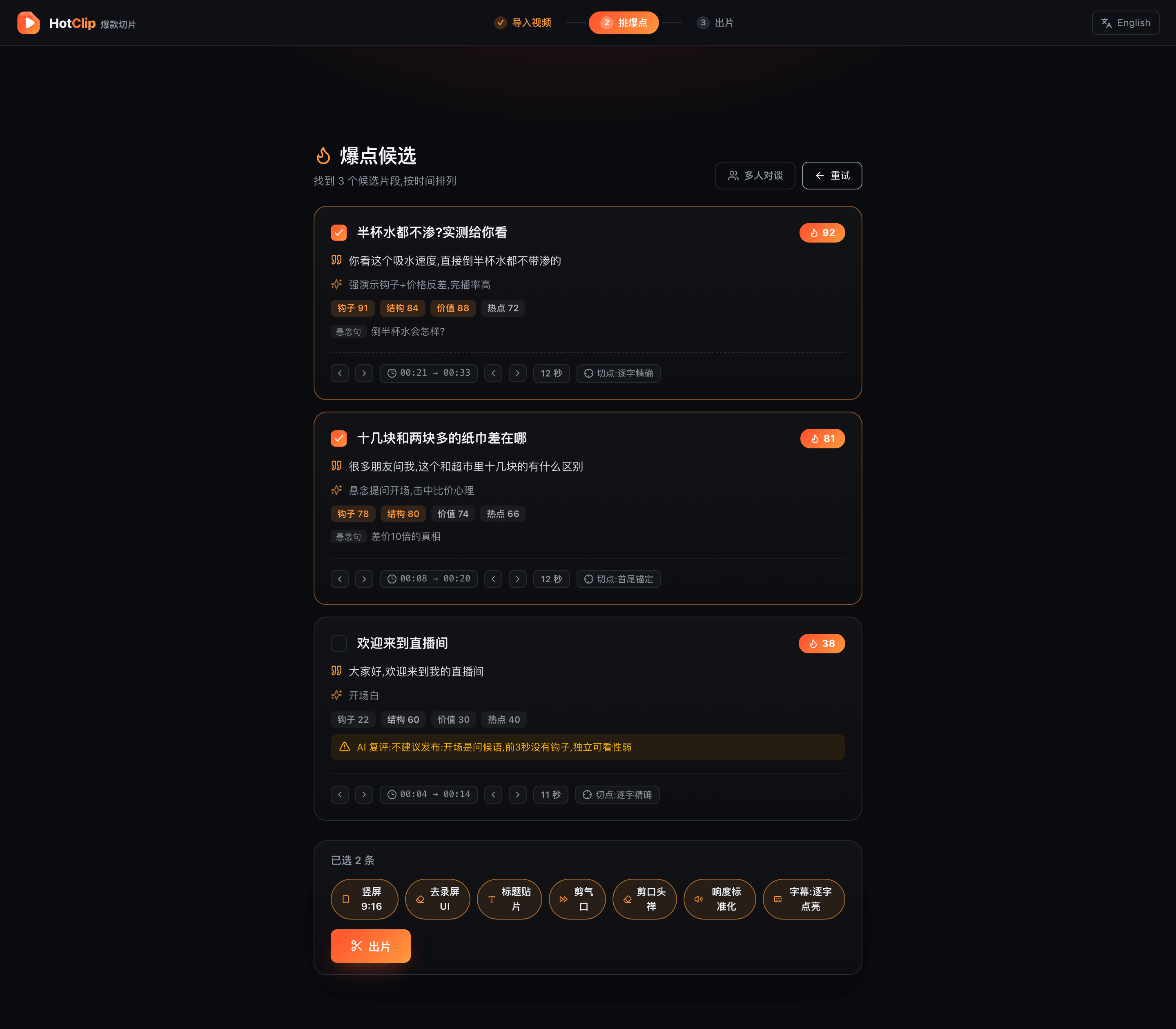
No 7-day trial, because there's no paid tier
No minute quotas, because nothing is metered
No credit card, because there isn't even an account
OpusClip's free tier meters 60 minutes — a fraction of one stream. HotClip doesn't count minutes.
Built for streamers, podcasters & talking heads
Streamers & clippers
Stream highlights AIClip your own VODs into highlight shorts right after the stream; the folder watcher turns finished recordings into clips while you sleep, and live-chat heat feeds straight into detection — Bilibili and Douyin chat logs both work, with gifts and superchats weighted extra.
Podcasters
Podcast to shortsAudio-only episodes still become video — an audiogram waveform plus quote captions turns your podcast into vertical clips; transcription is cached so re-cutting is instant.
Educators & marketers
Repurpose long-formLectures, webinars and demos become snackable clips with covers, titles and metadata — ready for a content pipeline, with a banned-words lint before publish.
Talking-head creators
Filler-word removalSilences, ums and stutters removed automatically; click-to-fix transcripts and a custom-vocabulary glossary keep names right, episode after episode.
How it compares
| HotClip | OpusClip / Klap / Vizard | CapCut smart clipping | FunClip etc. (open source) | |
|---|---|---|---|---|
| Price | Free & open source | $15–29+/mo, credits per source minute, expire monthly | Core features paywalled | Free |
| Your footage | Stays local | Mandatory cloud upload | Mostly cloud | Local |
| Watermark / caps | None | Free tier: watermark, caps, projects expire in 3 days | Some restricted | None |
| Account | No sign-up | Account required, projects deleted on unsubscribe | Login required | None |
| Setup | Double-click installer | Web app | Easy | CLI / Docker |
| Cut quality | Word-aligned, reasoning attached | Black-box scoring | Black box | Sentence-level, unranked |
Deep dive: HotClip vs OpusClip — a free, local, open-source alternative
FAQ
What is the best free Opus Clip alternative without watermark?
HotClip — free, open source (AGPL-3.0), local, no watermark, no credits, no length caps. Optional cloud LLMs bill your own key; a local Ollama model makes it fully free and offline.
Is there an AI clipper that runs locally without uploading my video?
Yes — transcription, captions, cutting and export all run on your machine. Only highlight detection calls a cloud LLM by default (your key, transcript text only); point it at local Ollama for a 100% offline pipeline.
How is it different from OpusClip / Klap / Vizard?
Your footage never leaves your machine. Those tools upload to the cloud and meter credits per source minute (expiring monthly; watermarked free tiers). HotClip is free, local, watermark-free — and every cut comes with auditable reasoning.
How do I add dynamic word-level captions?
They're automatic: local word-level transcription drives word-by-word highlighted captions burned into every clip. SRT export and bilingual captions are one toggle away.
Can it remove filler words and silences?
Yes — silence jump-cuts plus an um/uh filler pass, with caption timing remapped automatically. Every edit is logged to clips.json so you can audit what the AI did.
How does HotClip handle HDR video?
HotClip tone-maps PQ or HLG to tagged SDR BT.709 only when primaries, colour matrix and range are complete and supported; available MaxCLL or mastering-display peak metadata constrains highlights. Incomplete or unsupported HDR is marked unconverted, while a colour-inspection failure is labelled separately. Both keep SDR-domain adaptive finishing off; jump cuts, stitched pieces, caption overlays and safe repairs preserve the decision. No new model, download or upload is involved.
How does the smart cover avoid black, blurry or transitional frames?
Audio peaks and a uniform reserve propose moments, then HotClip ranks the finished post-QA clip locally for sharpness, information, exposure, tonal range and short-neighborhood stability. Unsafe frames are rejected, variants use different ranks, and probe failure returns exactly to the prior audio timestamp.
Can live-chat data help pick highlights?
Yes — HotClip auto-discovers the chat log next to a recording (BililiveRecorder .xml and Douyin-recorder .jsonl both work) and feeds chat density plus superchats, gifts, follows and like bursts into detection, with per-sender spam caps and surge bonuses. No chat file? Loudness, shot-cut, motion, facial-emotion and laughter signals take over.
Do I need a GPU?
No — the local ASR models are int8-quantized and run fine on CPU.
Does it work for Chinese video?
Yes, exceptionally well — dedicated Chinese ASR engines (SenseVoice / Paraformer / FireRedASR2) cover dialects, Cantonese and code-switching.
Can I clip other people's streams?
HotClip is for your own content or clips you're authorized to make (e.g. streamer clipping programs). Unauthorized re-uploading is not supported and not welcome.
Give your next replay to HotClip
Windows / macOS / Linux · free & open source · no sign-up · double-click to run